
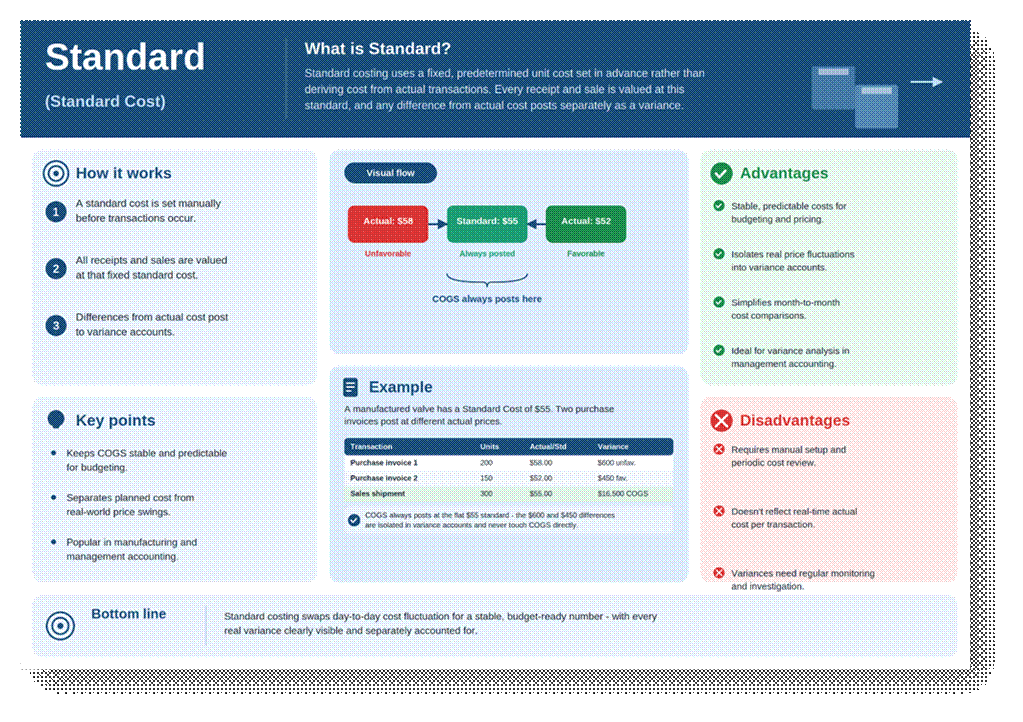
This Costing Method uses a Fixed, predetermined unit cost that is set manually (or via a standard cost worksheet) before transactions occur, rather than deriving cost from actual purchase or production activity. Every receipt and every outbound transaction is valued at this same cost.
Because the standard rarely matches the actual purchase price or production cost exactly, Business Central captures the difference as a Variance.
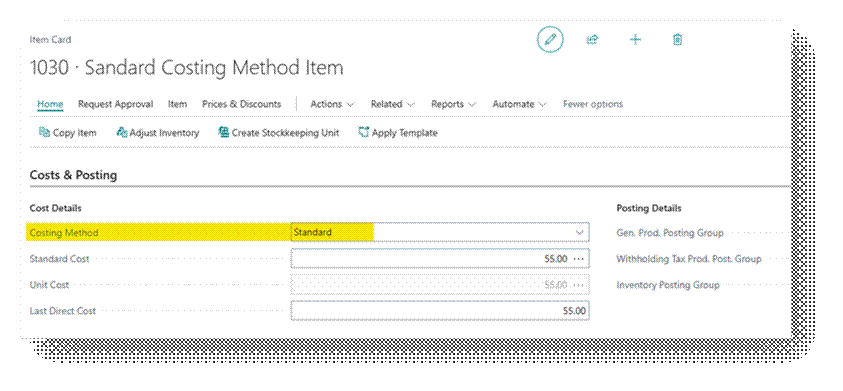
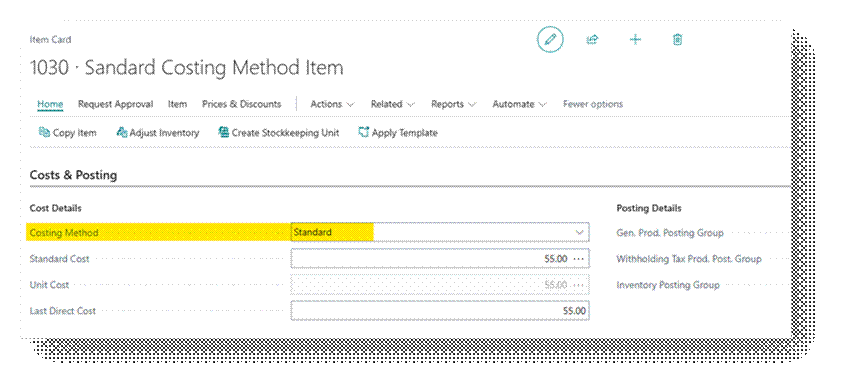
Costing Method Field
Standard is set on the Item Card’s Costing Method field, together with a Standard Cost value under the Costs & Posting FastTab.
Worked Example
Item ‘ITM-VLV-22’, a manufactured valve, has a Standard Cost of 55.00 per unit. Two Purchase Invoices post at different actual prices during the month.
| Transaction | Date | Quantity | Standard Cost | Actual Cost | Variance Posted |
| Purchase Receipt 1 | 1-Sep | 200.00 | 55.00 | 58.00 | 600 Unfavourable |
| Purchase Receipt 2 | 5-Sep | 150.00 | 55.00 | 52.00 | 450 Favourable |
| Sales Shipment 1 | 15-Sep | 130.00 | 55.00 | – | No Variance |
Key Rule – Inventory value and COGS both stay clean and predictable at exactly 55.00 per unit no matter what was actually paid.
Purchase Invoice #1: (58.00 − 55.00) × 200 = 600.00 Posted as an Unfavorable Purchase Price Variance “Actual Cost was Higher than Standard”.
Purchase Invoice #2: (55.00 − 52.00) × 150 = 450.00 Posted as a Favorable Purchase Price Variance “Actual Cost was Lower than Standard”.
The 300-unit shipment on 25-Sep is expensed at a flat 55.00 per unit = 16,500.00 COGS, completely unaffected by the price swings above.
When to Use This Method
- Manufacturing Companies wants stable, predictable product costs for budgeting and pricing decisions.
- Businesses that want Purchase Price Fluctuations isolated and visible in variance accounts rather than blended into COGS.
In Business Central
Let’s go the Item card first.
Now let’s Purchase this Item in a way we do normal Purchases.
Refer this document to learn the Procure to Pay Process in detail – https://ahmad365.com/procure-to-pay-process/
Refer this document to learn the Standard Costing Worksheet Process in detail – https://ahmad365.com/standard-cost-in-d365bc/
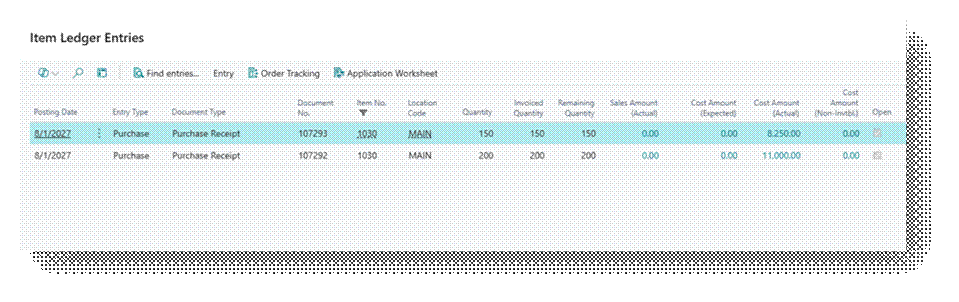
I have created the Example I explained above and in Business Central you can see the Details.
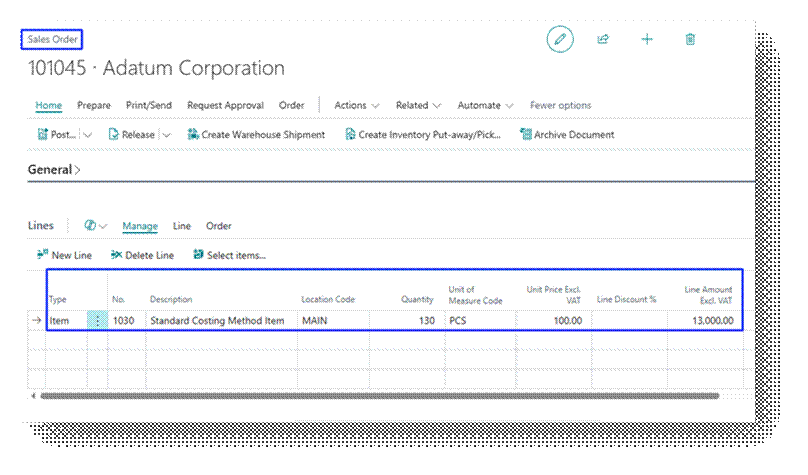
Now let’s Sell 130.00 Quantities.
Let’s Preview this Sales Invoices:
Cost Amount (Actual) – 7,150.00
| Transaction | Quantity | Unit Cost | Total Cost |
| AVCO Calculation | |||
| Sales Shipment # 1 | 130.00 | 55.43 | 7,205.90 |
| Total Amount (AVCO) | 7,205.90 | ||
| Standard Calculation | |||
| Sales # 1 | 130.00 | 55.00 | 7,150.00 |
| Total Amount (Standard) | 7,150.00 | ||
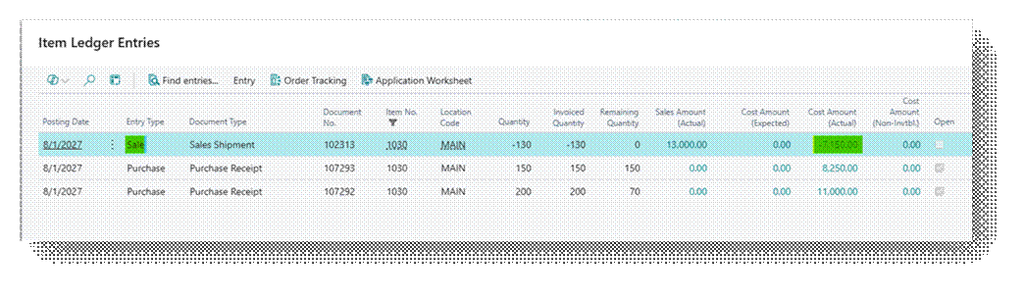
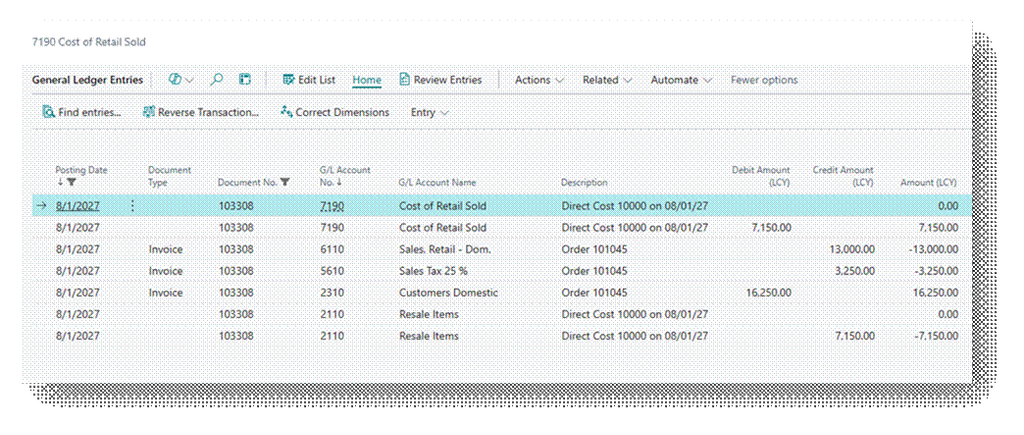
Check the GL Entry closely that Amount is coming according to Standard.
- Cost of Retail Sold – 7150.00 (Debit)
- Resale Items – 7150.00 (Credit)
But look closely check the entries of 56.90 Amount. So, in Practical system record the value in FIFO after adjusting the entry of difference in AVCO and Standard.
- Cost of Retail Sold – 7150.00 (Debit) + 0.00 (Credit) = 7150.00 (Debit)
- Resale Items – 7150.00 (Credit) + 0.00 (Debit) = 7150.00 (Credit)
So, In short this is how it works.