
What Are Payment Methods?
Payment Methods define how a payment is made or received. For Example, by bank transfer, cash, cheque, or credit card. They are assigned to customers, vendors, and documents to identify the mode of settlement.
Unlike Payment Terms which control when payment is due, Payment Methods control how the payment is made and importantly which G/L Account or Bank Account is Automatically Debited or Credited when the Payment is Posted.
Where Payment Methods Are Used
- On Master Card – Default Payment Method for all Purchase/ Sales Transactions
- Documents – Can be Overridden per Document
- Journals – Used when Applying Payments
Assigning Payment Methods
In business central as discussed above we can specify on multiple levels.
On Customer Card
Customer Card > Payments FastTab > Payment Method Code
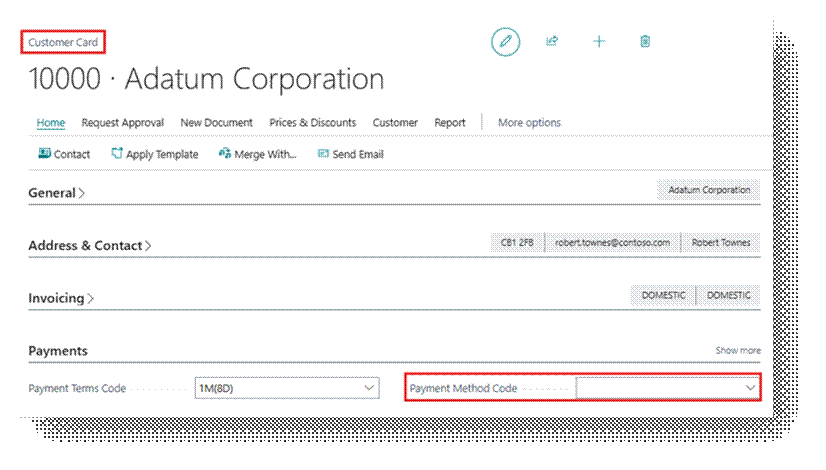
This sets the default for all sales documents for that customer.
On Vendor Card
Vendor Card > Payments FastTab > Payment Method Code
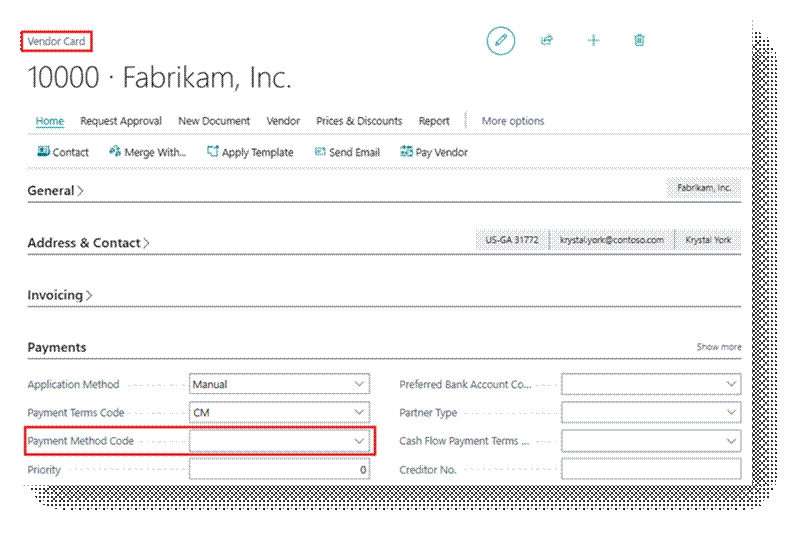
This sets the Default for all Purchase Documents for that Vendor.
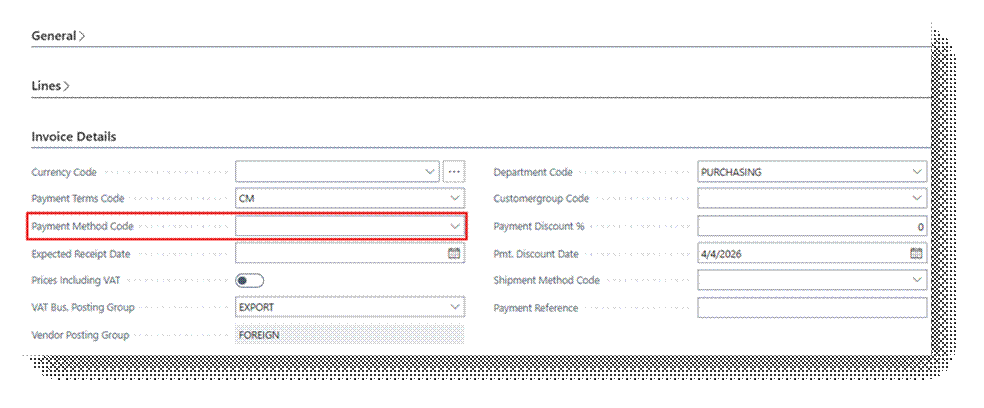
On a Document
On any Sales Order, Purchase Order, or Invoice, the Payment Method Code Field can be changed for that Specific Transaction.
Setting Up Payment Methods
Search > Payment Methods
- Click New and fill in the following fields:
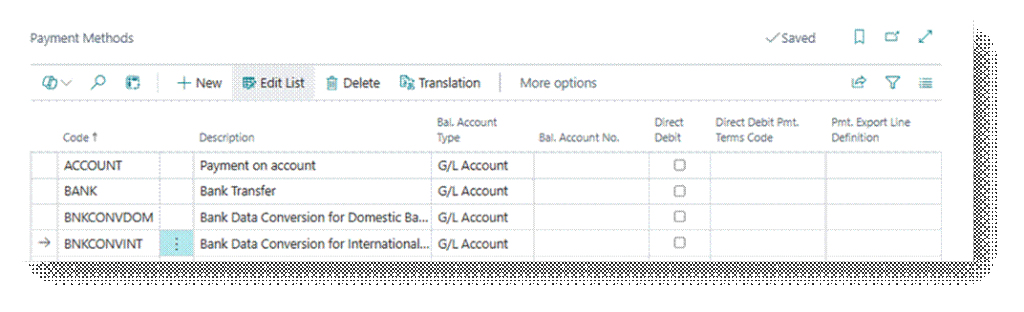
| Field | Description |
| Code | Short Identifier, e.g. CASH, BANK, CHEQUE, CC, etc. |
| Description | Full name, e.g. Bank Transfer, Cash Payment, etc. |
| Bank Account Type | The Type of Balancing Account like G/L Account or Bank Account. |
| Bal. Account No. | The specific G/L account or Bank Account to post against Automatically |
| Direct Debit | Enables SEPA direct debit functionality for this Method |
| Direct Debit Pmt. Terms Code | Specifies the payment terms that will be used when the payment method is used for direct debit collection. |
| Pmt. Export Line Definition | Specifies the data exchange definition in the Data Exchange Framework that is used to export payments. |
Understanding Bal. Account Type and Bal. Account No.
This is the most Important Part of Payment Method Setup. When a balancing account is configured, Business Central automatically creates the offsetting entry when the payment is posted, no manual entry required.
Example
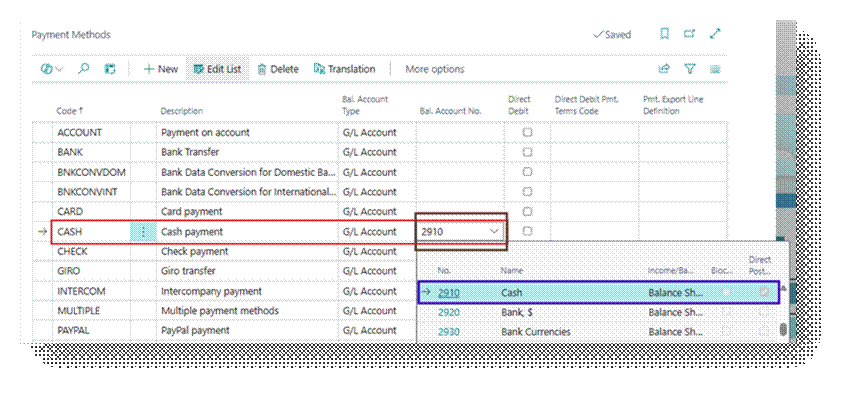
Cash Payment Method
- Bal. Account Type = G/L Account
- Bal. Account No. = 2910 (Cash Account)
- When a Customer Pays in Cash, Business Central automatically Debits the Cash G/L Account.
Bank Transfer
- Bal. Account Type = Bank Account
- Bal. Account No. = CHECKING-BANK
- When Payment is Received, Business Central Automatically Posts to the Bank Account
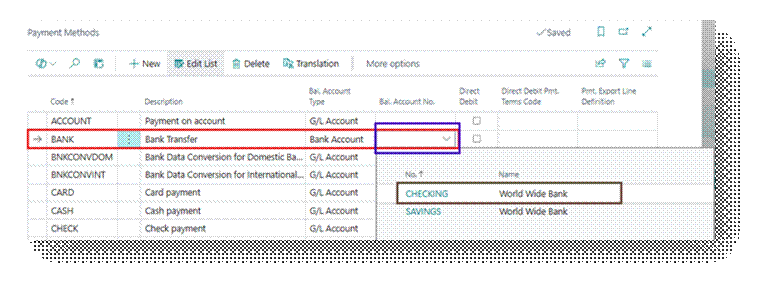
If Bal. Account No. is left blank, the payment method is informational only. No automatic posting occurs and the accountant must manually select the account when posting.
Common Payment Methods
| Code | Description | Bal. Account Type | Typical Use |
| Bank | Bank Transfer | Bank Account | Vendor Payments, Customer Receipts through Banks |
| Cash | Cash Payments | G/L Account | Walk-in customers, petty cash Payments |
| Cheque | Cheque | Bank Account | Vendor payments by physical Cheque |
| CC | Credit Cards | Bank Account | Customer Payments via Credit Card Terminal |
| DD | Direct Debit | Bank Account | Automated Recurring Customer Collections |
Payment Methods vs Payment Terms
| Payment Methods | Payment Terms | |
| Controls | How Payment is Made | When Payment is Due |
| Example | Bank Transfers, Cash, etc | Net 30, 2/10 Net 30, etc |
| Affects G/L | Yes | No |
| Affects Due Date | No | Yes |
| Affects Discount | No | Yes |
Note
Payment Method is informational on sales and purchase documents — it records how the customer or vendor is expected to pay. The actual financial posting happens in the Cash Receipt Journal (for customers) or Payment Journal (for vendors).