

Purpose
In Business Central version 29, Show Recently Used Records in Lookups highlights the records a user has recently used, so the right customer, vendor or item can be picked without searching. Selecting a value from a lookup is one of the most frequent actions in Business Central.
Availability
The table below summarizes the availability of recently used records in lookups.
| Detail | Value |
|---|---|
| Status | Launched, General Availability |
| Rollout start | October 2026 (Update 29.0) |
| Roadmap ID | 573368 |
| Area | User experience |
| Setup required | None |
How Recently Used Records in Lookups Work
A Sales Coordinator enters most orders for five key accounts, out of 3,000 customers in the system.
- Open Sales Orders and choose New.
- In the Customer Name field, open the lookup.
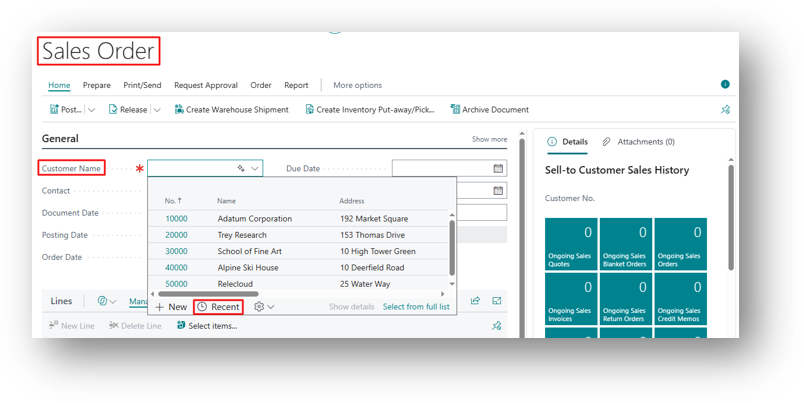
- The two customers used most recently appear at the top of the list.
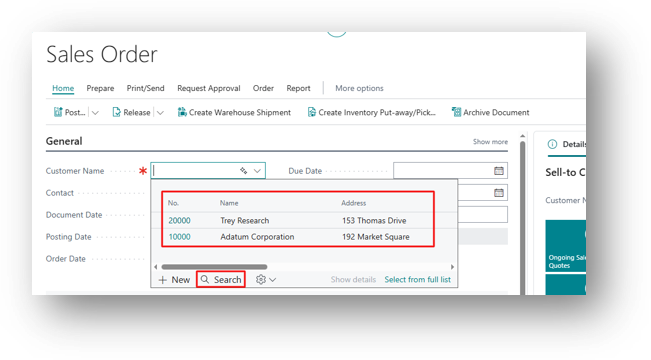
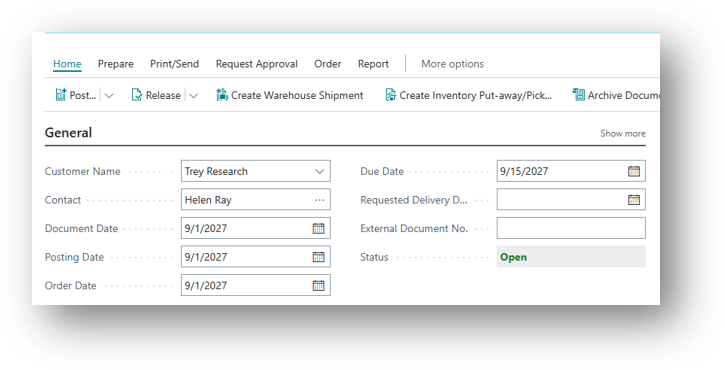
- Select the customer directly, without typing or filtering.
In addition, the same applies across lookups. For example, selecting a vendor on a purchase invoice, a G/L account on a general journal line, or a location on a transfer order or an item.
Why Recently Used Records in Lookups Matter
In most companies, users work with a small set of customers, vendors and items every day, even when the system holds thousands of records. However, before version 29, users had to type a name or apply a filter in every lookup. Because these records now appear first, the most likely choice is already at the top of the list. As a result, users save time and make fewer selection errors.
Where You Can Use Recently Used Records in Lookups
Recently used records in lookups work in many places across the application, for example:
- Customer Name on sales orders
- Vendor on purchase invoices
- G/L Account on general journal lines
- Location on transfer orders
- Item on document lines
Key Points About Recently Used Records in Lookups
- No setup is required. The feature is available from Update 29.0.
- Recently used records in lookups are based on what each user has recently selected.
- Users can still search or filter the full list as before.
For the full list of changes in this release, see What’s New or Changed in Business Central 2026 release wave 2 (Update 29.0) on Microsoft Learn.
Conclusion
In short, Show Recently Used Records in Lookups is a small change with a daily impact. Therefore, users who repeatedly work with the same records will spend less time searching and more time completing their transactions.
Related Articles
If you found recently used records in lookups useful, these related articles cover other improvements in the same release:
- Show Recently Searched in Tell Me
- Preview Images Directly in the Business Central Web Client
- Run Multiple Financial Reports as a Single PDF
- Business Central Feature Statuses Explained
Hope so this is Helpful 😃