
Purpose
Every New Business Central feature carries a status. The feature statuses tells you whether a feature exists yet, who can use it, and whether it is safe for production. Microsoft uses four separate types of status. They answer different questions, and a single feature has one of each at the same time.
| Type of status | Question it answers | Where you see it |
|---|---|---|
| Release Phase | How mature is the feature? | What’s new pages, release plans |
| Roadmap Status | Has Microsoft shipped it yet? | AI at Work roadmap |
| Feature Management Status | Can the admin still choose to use it? | Feature Management page in Business Central |
Release Phase
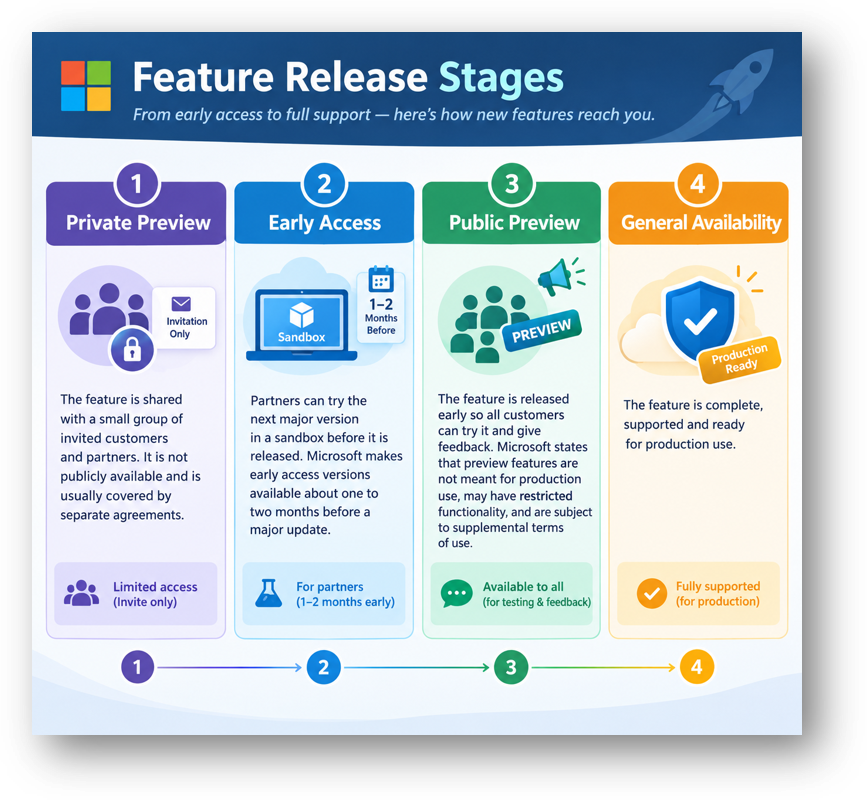
- Private preview means the feature is shared with a small group of invited customers and partners. It is not publicly available and is usually covered by separate agreements.
- Early access means partners can try the next major version in a sandbox before it is released. Microsoft makes early access versions available about one to two months before a major update.
- Public preview means the feature is released early so all customers can try it and give feedback. Microsoft states that preview features are not meant for production use, may have restricted functionality, and are subject to supplemental terms of use.
- General availability means the feature is complete, supported and ready for production use.
| Aspect | Private Preview | Early Access | Public Preview | General Availability |
|---|---|---|---|---|
| Who Can Use It | Invited Customers and Partners Only | Partners and Customers with Sandbox Access | All Customers | All Customers |
| Intended Use | Early Design Feedback | Preparing for the Next Major Version | Testing and Evaluation | Production Use |
| Microsoft Support | Through the Preview Program Only | Limited; Not for Production | Limited, Under Supplemental Preview Terms | Full Standard Support |
| Stability | Expected to Change | May Change Before Release | May Change, Be Delayed or Be Withdrawn | Stable; Changes Follow Normal Release Cycles |
| Where to Use It | Dedicated Test Environment | Early Access Preview Sandbox Only | Sandbox (Ideally a Copy of Production) | Sandbox and Production |
| Can Move to Production | No | No | No | Yes |
Hope so this is Helpful 😃