
Document Type and Initial Document Type field is available on Detailed Customer/Vendors Ledger Entries Table.
Document Type
This field shows the document type of the detailed entry itself, at the moment that specific detailed line was created. If the detailed line came from a journal, it is copied from the Document Type on the journal line. If it came from a sales or purchase document, it is copied from the Document Type on that document header.
This means Document Type can change from one Detailed Ledger Entry to the next, even though they all belong to the same Ledger Entry, because each detailed line can be created by a different kind of transaction (an invoice, then later a payment applied to it, then later a refund).
Initial Document Type
This field always shows the document type of the very first, original entry that the Ledger Entry was created from. It is copied once, from the Document Type of the Initial Entry, and it stays the same on every Detailed Ledger Entry linked to that Ledger Entry afterward, no matter what later happens to it.
Example
Gulf Star Trading posts a sales invoice, Document No. 103311, for GBP 5,000 to Customer.
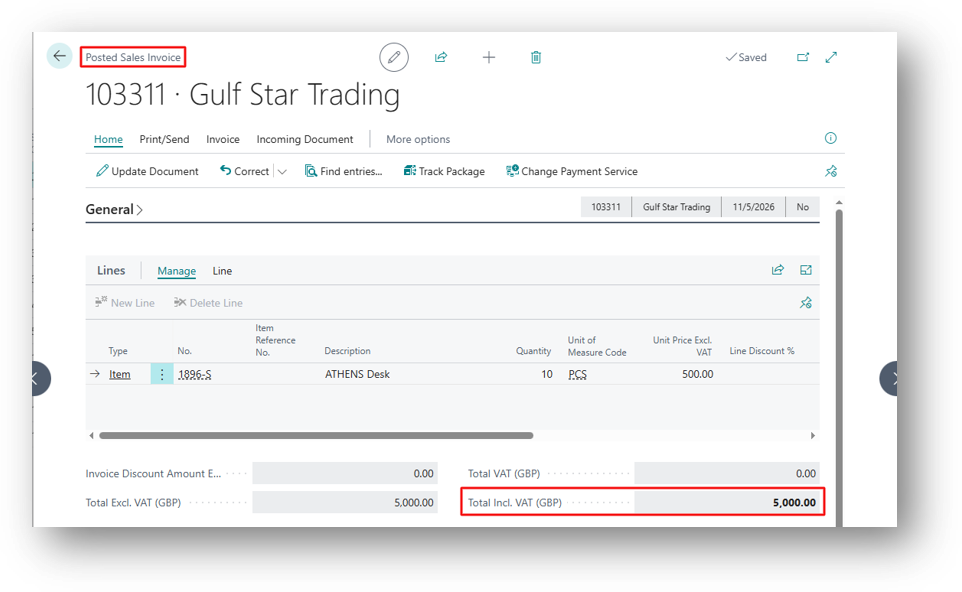
Detailed Cust. Ledg. Entry created:
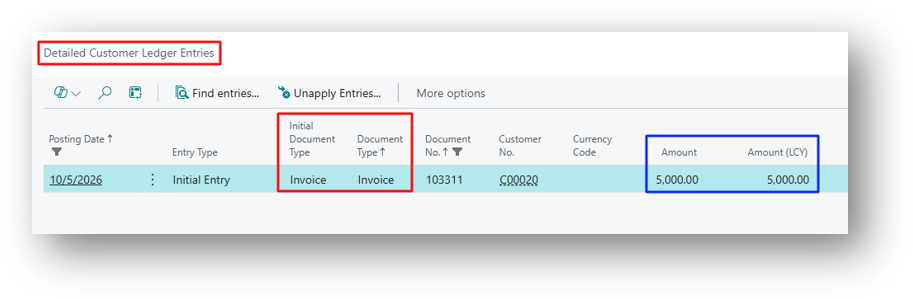
| Entry Type | Document Type | Initial Document Type |
| Initial Entry | Invoice | Invoice |
Here both fields are the same, because this is the first entry.
The customer later returns part of the order. A credit memo, for GBP 5,000 is posted and applied against the invoice.
Three new Detailed Ledger Entries are created by this application:
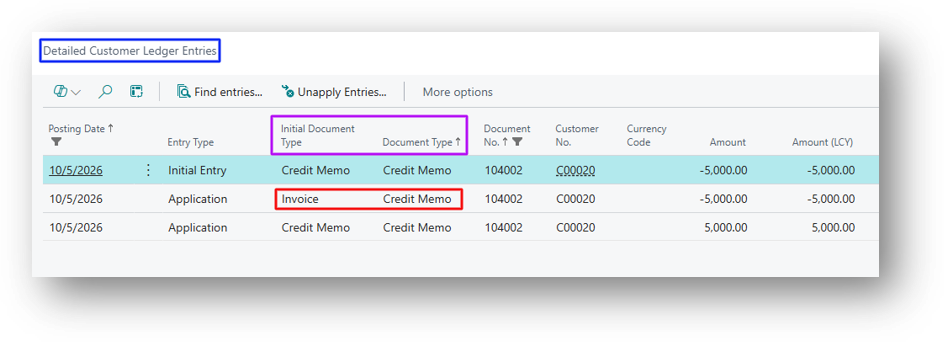
| Entry Type | Document Type | Initial Document Type |
| Application | Credit Memo | Invoice |
The first line’s Document Type is Credit Memo, because that detailed line represents the credit memo side of the application. The second line’s Initial Document Type is Invoice, because it represents the invoice side.
Why it Matter’s
If you filter or sum Detailed Ledger Entries by Document Type, you get a mixed picture, since it changes line by line depending on which side of an application created the entry. If you filter or sum by Initial Document Type, you get a clean grouping of all activity that belongs to the same original transaction, whether that activity came from applications, discounts, or adjustments.
This is the field to use when building a report that needs to answer, “show me everything that happened to this invoice,” rather than “show me every line of type Invoice.”
Hope so this is Helpful 😃