
In Dynamics 365 Business Central, the distinction between Unit Volume and Cubage is pivotal, with each finding its place in specific business processes.
Item Units of Measure – Cubage
The Cubage field, automatically derived from the Item Unit of Measure’s width, length, and height, plays a crucial role in Warehouse Management System (WMS) documents such as picking, put-away, and movements. It serves to calculate whether an item can fit into a designated bin. The Bin Capacity Policy, defined in the location card, guides Business Central in evaluating the total cubage of items to be stored or moved against the maximum capacity of the bin.
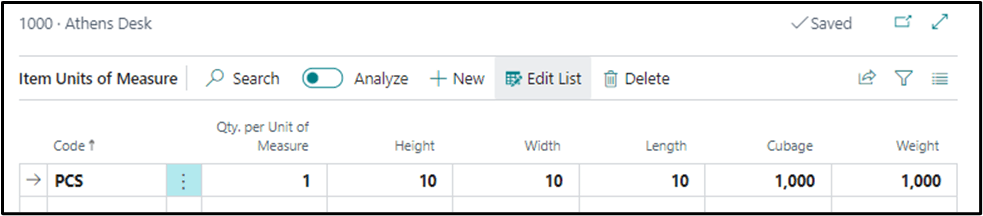
Item Unit of Measure – Cubage
Item – Unit Volume
Conversely, Unit Volume is utilized in non-WMS documents like sales, purchases, and transfers. Its primary application lies in completing customs documents and waybills. It’s important to note that the Unit Volume in documents is not automatically multiplied by the Quantity; manual calculation of the total volume is required.
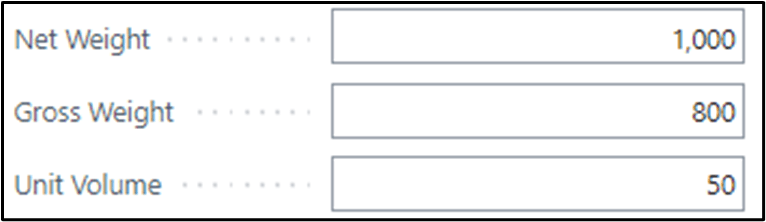
Item – Unit Volume
In Summary:
- Cubage: Internally utilized within the warehouse for WMS processes, ensuring efficient space utilization.
- Unit Volume: Externally employed for non-WMS documents, aiding in customs paperwork. Requires manual calculation for total volume.
It’s worth noting that a similar pattern exists with the Item Unit of Measure – Weight, utilized internally in the warehouse, while Item – Net Weight and Gross Weight are designated for external documents and are not automatically multiplied by Quantity. This nuanced understanding ensures a streamlined approach to managing volume and weight information based on the specific operational context.